
Engineering & AI
Stage a 3D scene before generating AI images with ArtCraft
ArtCraft lets you place characters and props, set the camera in 3D, and compare the generated image with the composition you planned.
Summary
- ArtCraft lets you place characters, props, and the camera before generating an AI image.
- Layer 2D artwork, arrange objects in 3D, and use a mannequin to guide the pose.
- Generate two images from the same scene with different camera angles and compare each with its reference frame.
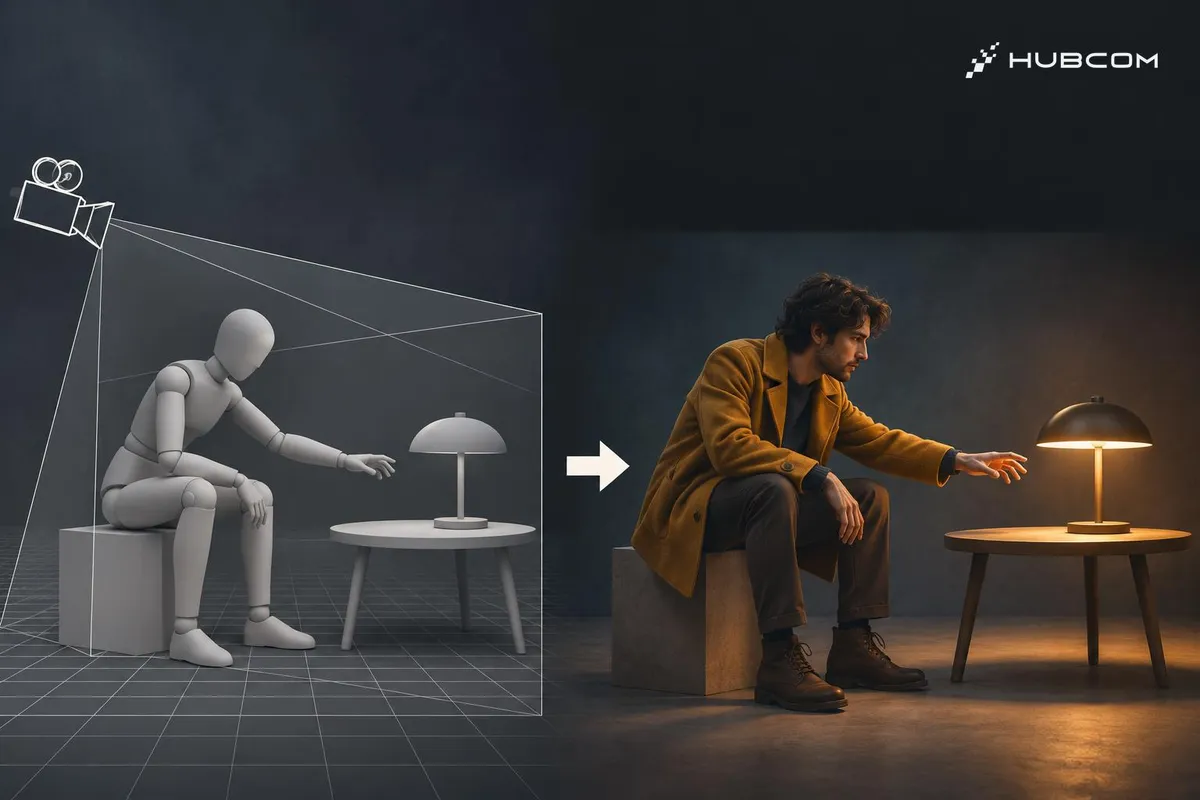
If an image needs to show someone sitting beside a table and reaching toward a lamp, you can stage the position and pose in ArtCraft before generating it. The 3D frame gives you a reference for checking whether the output keeps the composition you planned. ArtCraft README
HubCom reviewed the public documentation and demos for ArtCraft v0.41.1 on November 21, 2026. We have yet to run the exercise below or use ArtCraft on a client project.
What does it solve?
- Place subjects and props deliberately. Use the 3D frame to determine depth and what each element obscures.
- Review several angles of one scene. Keep the props in place and move the camera to compare framings before generating an image. ArtCraft README
Features
- 2D Compositing combines image layers, background removal, and tools for editing selected areas.
- 3D Compositing places backgrounds, foreground elements, and props at different depths.
- Character Posing lets you adjust the pose and position the camera before generating the image. Features and original demos

When to use it
Try ArtCraft when a shot calls for a specific subject placement, point of view, or distance from a prop. For a sequence set in one room, reuse the scene to compare the composition across angles. ArtCraft documentation and demos
What to watch for
- Use the installer for your operating system. Check the release assets. ArtCraft v0.41.1
- Check image model access. The README lists several models and providers. Check the model and its access requirements before generating a batch. Model catalog
- Review the generated images. The 3D frame provides a composition reference. Check subject placement, pose, and framing again after generation.
Trial setup
Set up a simple scene with a chair, table, and lamp. Pose a seated mannequin with one hand reaching toward the lamp. Generate two images with the same scene, prompt, and model. Change only the camera angle between runs.
Steps
- Stage and pose. Place the table beside the chair and the lamp on the table, then adjust the mannequin's arm. Posing demo
- Choose two camera angles. Use one front view and one oblique view. Save a reference image for each framing.
- Generate from each frame. Use the same prompt for the character and lighting. Open each result alongside its corresponding 3D reference. ArtCraft demo
Common mistakes
- Changing too many variables. Keep the prompt and model fixed to make camera changes easier to identify.
- Choosing a polished image with the wrong layout. Check the relative positions of the person, table, and lamp.
How to verify the result
- Check the viewpoint. The oblique view shows the tabletop differently from the front view.
- Check the action and contact. The person is seated, their hand reaches toward the lamp, and the lamp rests on the table.
- Compare the two images. Check the chair and table positions. If both images need the same character, compare the clothing and face as well.
Out of scope
Video generation, staging a full sequence, and self-hosting an image generation service.
Terms in this article (4)
- ArtCraft
- An app for 2D compositing, 3D staging, and creating images or video with AI models.
- Scene staging
- Arranging the character, props, and camera to determine what appears in frame.
- Character Posing
- Adjusting a mannequin or character's body pose to guide the generated image.
- 3D Compositing
- Combining backdrops, images, and objects at different depths in a 3D scene.
Frequently asked questions
Does ArtCraft need a 3D model for every prop?
The README shows that a 3D scene can combine image cutouts, backdrops, and 3D objects. The exercise needs only a few simple props.
Does ArtCraft run every image model locally?
ArtCraft has a desktop installer. Its documentation lists different providers and models, so check the access method for the model you choose.
Sources
- ArtCraft README, ArtCraft Team
- ArtCraft v0.41.1, ArtCraft Team
- 3D Canvas demo, ArtCraft Team
- Official demo video, ArtCraft Team
- ArtCraft Studio, ArtCraft Team
- License notices, ArtCraft Team